In short, other members never see your email address, your profile is private until you change it, and nobody can see who follows what.
Your email address
- 1
Other members never see your email address. It is not on the People tab, in a request to join, or in a message from an organiser.
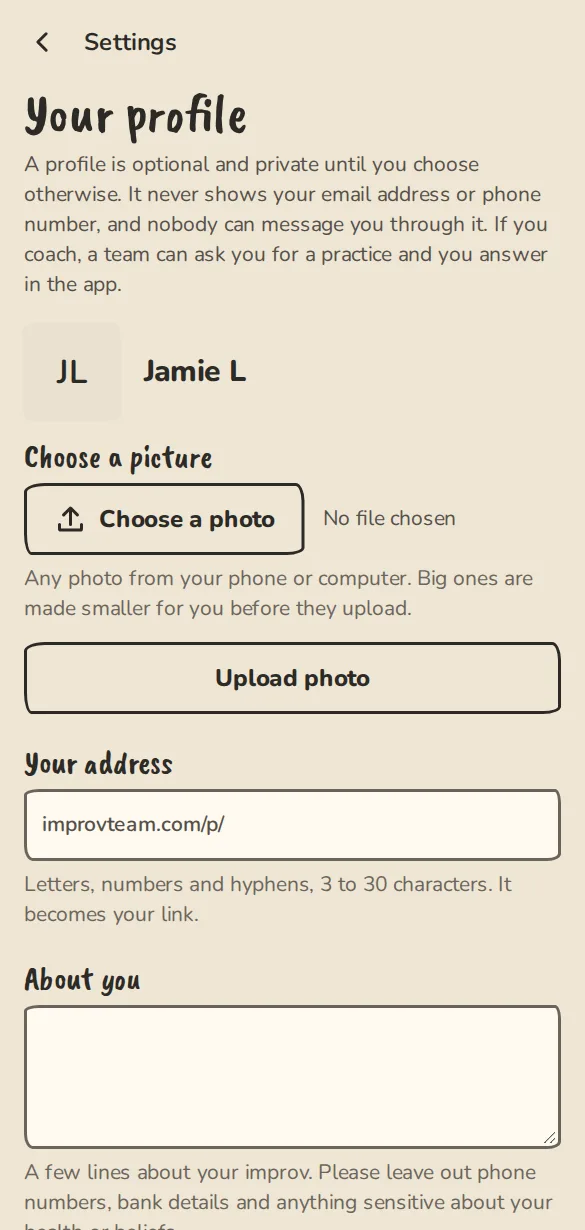
The profile settings on a phone: photo, handle, about and who can see it. - 2
When an organiser writes to the cast, we deliver it to each person by email or notification. The organiser never sees the addresses, and replies to that email are not read.
- 3
Organisers do see an address you gave them for a reason: a ticket or pass you bought (it is on the door list), a group's news you asked for by email, an application you sent, or the address they typed to invite you.
- 4
Replies on a city's team-finder board are passed on through the app. Neither side sees the other's email address.
Inside a group
- 1
In a team, everyone in the team sees who said Yes, Maybe or No to each event, and any note you added to your answer.
- 2
Your stats (practices, shows, how quickly you answer, no-shows) are seen only by you and the group's organisers. Other members never see them.
- 3
When you write a note about a practice or show, you choose who reads it: the whole team, only you, or one other member. An organiser cannot read a note that is private or meant for someone else.
- 4
The group chat link shows only to active members. It is never on a public page.
Your profile
- 1
A profile is optional. To make one, open Settings, then Profile. Open your profile
- 2
Under Who can see it, pick Only me (not listed anywhere), Signed-in people (anyone signed in who has your link) or Anyone (anyone with the link, and search engines).
- 3
With Anyone, Coaching (I coach teams) ticked and a city set, you are listed in the coach directory for your city.
- 4
A profile never shows your email address or phone number, and nobody can message you through it.
What the public sees
- 1
Public pages show only what an organiser chose to publish, such as a public team page, a show's ticket page or a past show in the archive.
- 2
Who you follow is private. There is no follower list or follower count anywhere, for you or for the group. Settings, then Following, shows the list to you alone.
- 3
A post on a city board is public: its text, the date it ends and your display name (or your group's name).
- 4
For how we protect your account and your group's data, and how to report a security problem, read the security page. Open the security page
Good to know
Try it in a sandbox
Make a private copy with made-up people and follow these steps without changing anything real.
Still stuck?
Write to us from the contact page. Say which page you were on and what you tapped.