You decide which groups may email you, and every email has a way out at the bottom. Sign-in codes always arrive, because you asked for them.
Mute a group
- 1
Open Settings, then Notifications, and scroll down to Email from your groups. Open Email from your groups
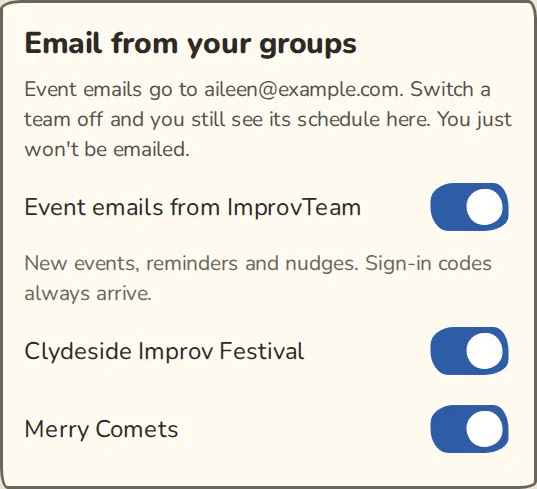
The "Email from your groups" switches in Notifications on a phone, one for each group. - 2
Switch off the group you want to hear less from. It stops emailing you, and you still see its schedule in the app.
- 3
Switch off Event emails from ImprovTeam to stop event emails from every group at once.
- 4
Changes save as you make them.
Move a kind of email to push
Each kind of message can go to email, push or both, but not to nothing. Moving one to push needs push turned on for at least one of your devices.
- 1
On the same page, What to send lists each kind of message: new events and invites, reminders and nudges, polls, money and the rest.
- 2
With a device listed under Your devices, set a row to Push and that kind stops coming by email.
- 3
Money messages always come by email as well, so you don't miss what you owe.
Unsubscribe from an email
- 1
At the bottom of every email from a group there is an unsubscribe link, such as Unsubscribe from this group, next to Email settings.
- 2
Tap it. The page asks, for example, Stop email from Merry Comets?. Tap Unsubscribe. You do not need to sign in.
- 3
You see You're unsubscribed. To undo it, tap Undo, send me email again, then Yes, turn them back on.
- 4
Your mail app may show its own Unsubscribe button at the top of the email. That works too.
Newsletters and the weekly city list
- 1
Each news email and each weekly city list has an unsubscribe link at the bottom.
- 2
Tap it, then Unsubscribe on the page. For a city list the page asks, for example, Stop the Glasgow list?.
- 3
To stop everything in one go, tap Leave every list for this address. It stops every group's news and every city list sent to that email address.
- 4
If you get it wrong, the page you land on has an undo button.
Good to know
What it doesn't do yet
Try it in a sandbox
Make a private copy with made-up people and follow these steps without changing anything real.
Still stuck?
Write to us from the contact page. Say which page you were on and what you tapped.