Each kind of message can reach you by email, by a push notification on your phone or computer, or both. Once notifications are on for your phone, we send most things as push and not as email, unless you choose email or both for a kind of message. Without a phone, email is the start. Money, tickets and invites always come by email too, whatever you pick. Email costs ImprovTeam money to send; push notifications and your inbox do not.
On the same page you choose which of your groups may email you at all.
Email, push or both
- 1
Open Settings, then Notifications. Open Notifications
- 2
To use push, tap Turn on notifications under Turn on push on this device, and allow notifications when your browser asks.
- 3
Under What to send, each row offers Email, Push or Email and push. A row you have not touched says Push, because you have the app. Pick another one for New events and invites, Reminders and nudges, Waitlist, Polls and the rest, and your choice stays until you change it.
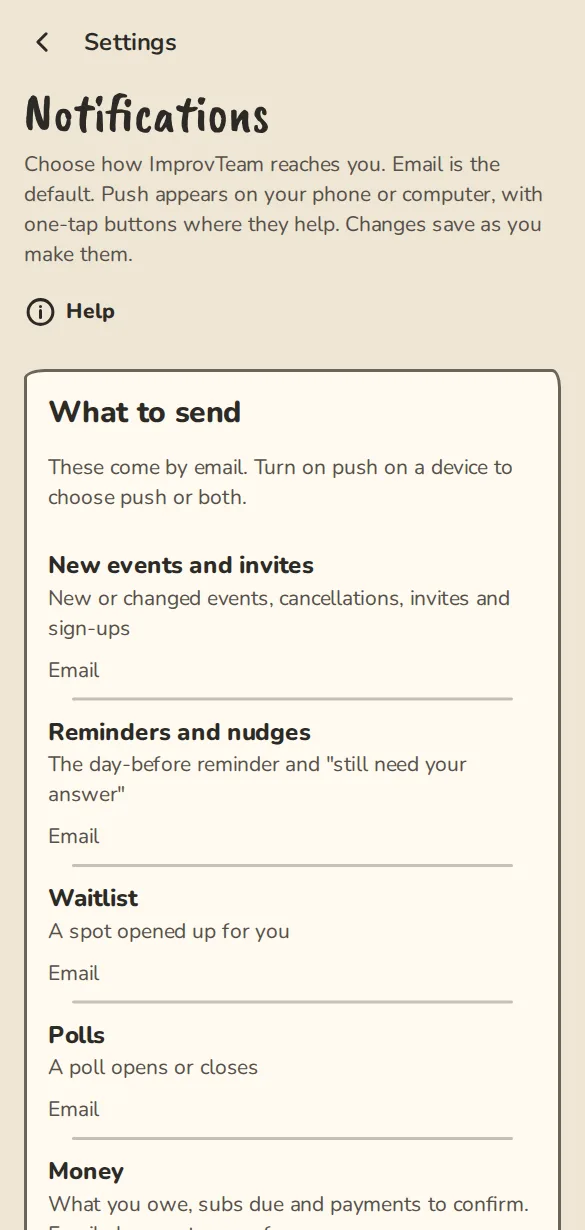
The Notifications settings on a phone: email, push or both for each kind of message. - 4
Changes save as you make them. A Saved note pops up each time.
- 5
Money, Tickets and shows and Invites to groups only offer Email or Email and push, so nobody misses what they owe, a ticket or an invite. Sign-in codes and account notices always come by email. Account security always comes by email and push and cannot be changed.
Push on each device
Push is set up per device. Your phone and your laptop each need turning on.
- 1
On each phone or computer you want notifications on, open Settings, then Notifications, and tap Turn on notifications.
- 2
On iPhone or iPad, add ImprovTeam to your home screen first and open it from the icon. A Safari tab cannot show push notifications.
- 3
Your devices are listed under Your devices, for example Chrome on Android · This device.
- 4
To stop push on the device in your hand, tap Turn off on this device. To drop an old phone, tap Remove next to it.
Which groups may email you
- 1
On the same page, scroll down to Email from your groups.
- 2
Switch a group off and it stops emailing you. You still see its schedule in the app.
- 3
Switch off Event emails from ImprovTeam to stop event emails from every group at once. Sign-in codes always arrive.
Good to know
What it doesn't do yet
Try it in a sandbox
Make a private copy with made-up people and follow these steps without changing anything real.
Still stuck?
Write to us from the contact page. Say which page you were on and what you tapped.