This is the same tour the "Show me around" button gives you, written down. It is five stops: Home, Create, a group's tabs, Find and Help. You can skip it, and nothing in it changes anything.
The five stops
- 1
Home is where you land. Needs you lists what is waiting for an answer, and below it is what is coming up across all your groups.
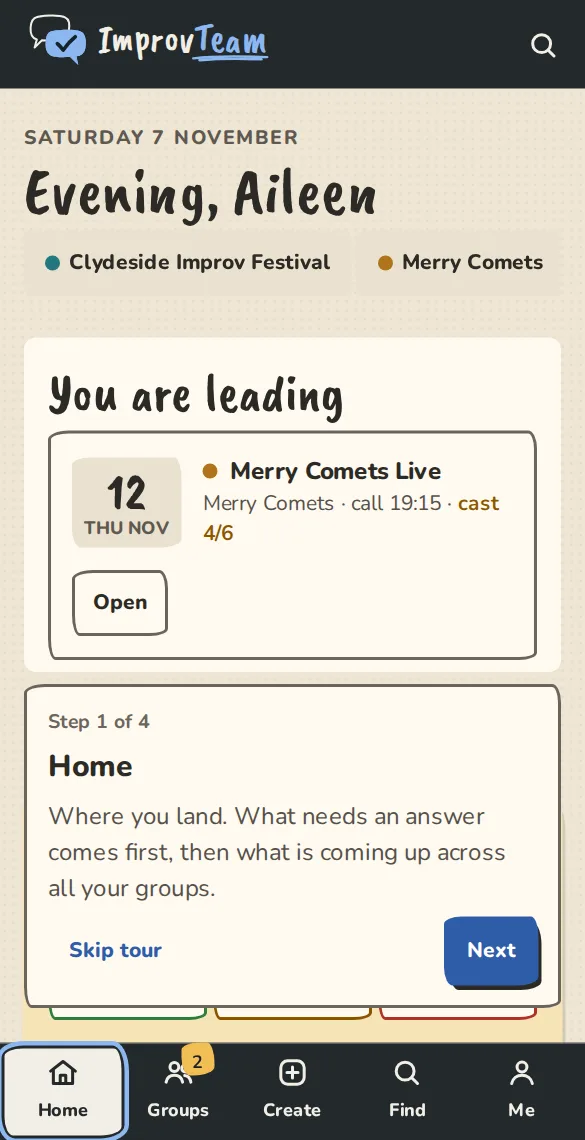
The "Show me around" tour on a phone, starting at Home. - 2
Create starts something: a team, a drop-in group, a show, a course or a festival. It only asks for a name and a city to begin.
- 3
Inside a group the tabs along the top are its parts: the schedule, people, money, polls, notes and more. On a phone they scroll sideways.
- 4
Find looks for improv near you: teams, classes, jams, theatres, rehearsal rooms and festivals.
- 5
Help has a short guide for each part of the app. This page is one of them.
Take the tour on screen
- 1
Open Home and tap the button below. The tour rings the real menu, one stop at a time, with Back, Next and Skip. Escape closes it too. Take the tour on Home
- 2
The button needs JavaScript. Without it, this page is the tour.
The sample group
- 1
Try it with sample data on Home opens a made-up team with a schedule, a poll, some money owed and a show. Everyone in it is invented. Try it with sample data
- 2
You can open every page of it. Nothing in it can be changed, and it never shows up in lists, search or other people's accounts.
- 3
To change things, make a sandbox in Settings: a team, a drop-in group, a show, a festival, a theatre or a camp, already filled with made-up people and things to do. See Try things out in a sandbox. Make your own sandbox
- 4
It is yours to edit. Nothing leaves it, card payments use Stripe test cards (no real money), and we delete it after 30 days without anyone opening it.
Good to know
What it doesn't do yet
Try it in a sandbox
Make a private copy with made-up people and follow these steps without changing anything real.
Still stuck?
Write to us from the contact page. Say which page you were on and what you tapped.