After a session, the host ticks who came. That does two jobs: the room cost is split as your group chose (by default between the people who came), and anyone who said yes and didn't turn up gets a no-show.
Owners, admins and hosts can take attendance once the session has started.
Take the register
- 1
Open the session page. Once it has started, you see an Attendance button at the bottom.
- 2
Under Who came?, everyone who signed up is listed and ticked. Untick anyone who didn't come: they get a No-show label.
- 3
If someone turned up without signing up, tap Add someone who just turned up, type their name and email, and tap Add and tick. They are added to the group.
- 4
In a free group, tap Save attendance and you are done. Otherwise tap Next: split the room cost.
Split the room cost
- 1
Type the Room cost. Leave out anything already covered by subs.
- 2
Under Paid by, pick The group, or the member who paid the room. Their own share counts as paid already.
- 3
Each person pays shows the share. Turn on the round-up switch if you would rather collect a round number; the page shows how much extra that collects.
- 4
Check What gets sent, then tap Confirm and send. Everyone who shares the cost is emailed what they owe and how to pay, and it shows on the group's Money tab.
- 5
Under Paid cash at the door, tick anyone who paid you in cash. They are marked paid straight away and are not emailed. If everyone paid cash, nobody is emailed.
- 6
For a drop-in that works pay what you can (Settings, Sign-ups, cost), enter what each person paid, or tick cash for the suggested amount. If you set a least amount, we refuse anything under it.
The no-show rule
Open groups start with this rule on: say yes and don't turn up twice within 3 months and you can only join the waitlist for the next month.
- 1
Open the group, tap Settings, then No-show rule.
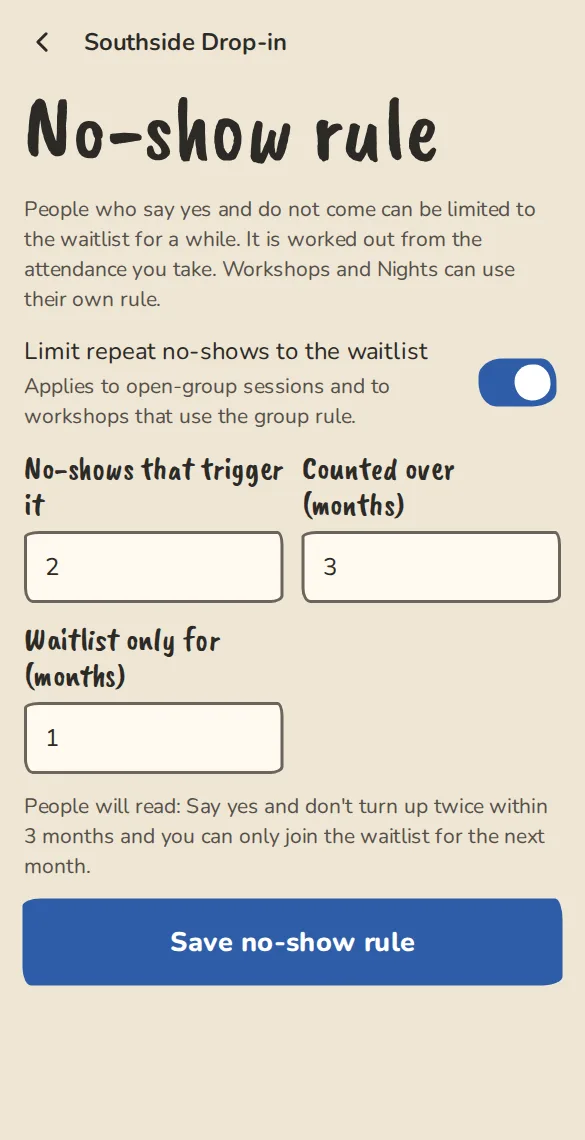
The no-show rule settings of a drop-in group on a phone. - 2
Switch Limit repeat no-shows to the waitlist on or off. Set No-shows that trigger it (1 to 10), Counted over (months) and Waitlist only for (months) (1 to 12 each).
- 3
Tap Save no-show rule. The page shows the sentence players will read before they sign up.
- 4
On the attendance page, a no-show that counts carries a warning, like 2nd no-show in 3 months. Waitlist only until and the date.
- 5
You can also set an answer lock for your drop-in (Settings, Answers, costs and terms; off unless you set one). After it, dropping out still frees the place for the waitlist, but we mark it a late drop-out and it counts as a no-show.
Good to know
What it doesn't do yet
Try it in a sandbox
Make a private copy with made-up people and follow these steps without changing anything real.
Still stuck?
Write to us from the contact page. Say which page you were on and what you tapped.