A calendar feed puts your practices, shows and sessions in Google Calendar, Apple Calendar or Outlook and keeps them up to date. You subscribe once.
It only shows events. You still answer in ImprovTeam.
All your groups in one calendar
- 1
Open Settings, then Calendar feeds. Open Calendar feeds
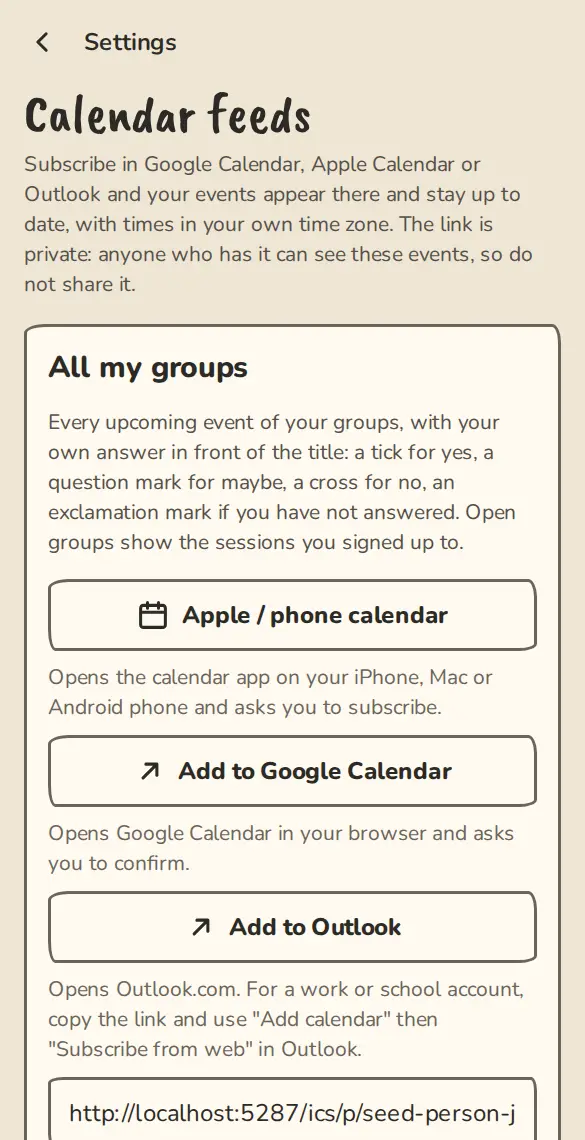
The Calendar feeds settings on a phone, with the private feed link and buttons for calendar apps. - 2
Under All my groups, tap Apple / phone calendar on an iPhone, Mac or Android phone, Add to Google Calendar for Google, or Add to Outlook for Outlook.com.
- 3
Your calendar app asks you to confirm. Say yes and the events appear.
- 4
For a work or school Outlook, tap Copy link, then in Outlook choose Add calendar, then Subscribe from web, and paste it.
- 5
Each title starts with your answer: a tick for yes, a question mark for maybe, a cross for no, three dots on a waitlist, an exclamation mark if you have not answered.
One group only
- 1
On the same page, under One group at a time, choose the group and tap Show.
- 2
Subscribe the same way. A group feed has all its events, without your answers.
- 3
Or open the group, tap Share, then Add to your calendar.
If your link got out
- 1
Open Settings, then Calendar feeds, and tap Reset my links at the bottom.
- 2
Every old link stops working at once, in every calendar app. Subscribe again with the new one.
Good to know
What it doesn't do yet
Try it in a sandbox
Make a private copy with made-up people and follow these steps without changing anything real.
Still stuck?
Write to us from the contact page. Say which page you were on and what you tapped.