When a team splits a room or a coach, or charges monthly subs, what you owe shows on its Money tab and on your Home page.
You pay the group, not ImprovTeam. We never hold, send or refund money.
See what you owe
- 1
On Home, a banner says who you owe and how much, for example You owe Merry Comets. Tap Pay. Or open the group, then the Money tab.
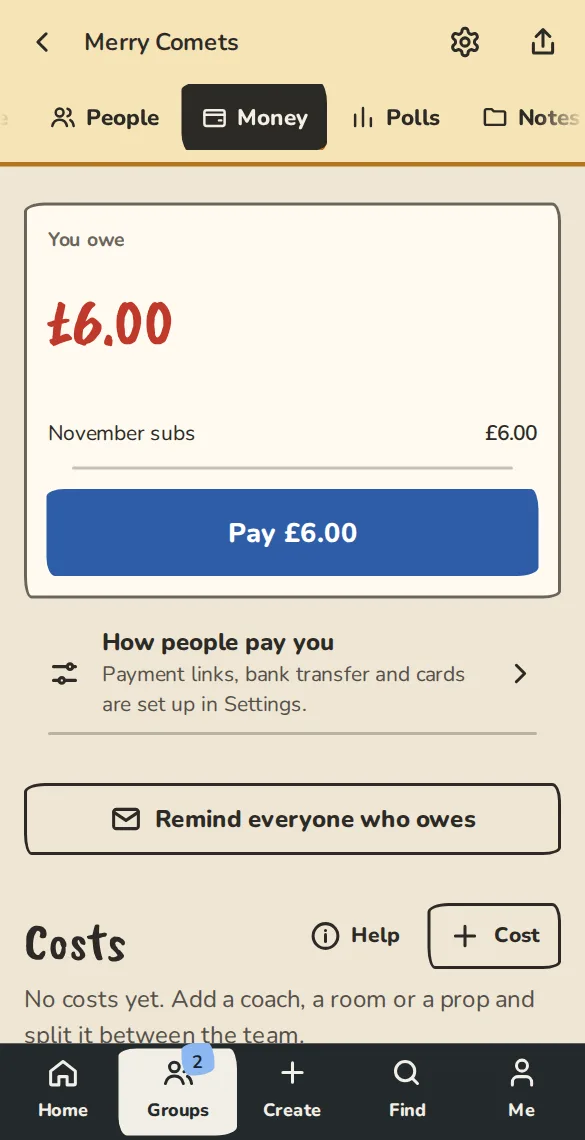
A team's Money tab on a phone, as a player sees it: what you owe and how to pay. - 2
Under You owe you see each item, such as November subs, and the total. All square means there is nothing to pay.
- 3
The You owe email says the same, with ways to pay and an I've already paid button that needs no login.
Pay
- 1
On the Money tab, tap the button with the amount on it, for example Pay £6.00. You see the ways this group takes money.
- 2
A payment link: tap its button (for example Open Monzo.me) and pay there. The page shows where the link goes before you tap.
- 3
Bank transfer: tap the button to ask an organiser for their bank details (for example Ask Aileen for bank details). They reply in the group chat or a message. Put the reference shown, which starts IT-, on the transfer.
- 4
Card, if the group has switched cards on: tap the card button (for example Pay £6.00 by card) and pay on Stripe. No card fee is added. A card payment marks you paid straight away.
- 5
If there is no way to pay online yet, ask an organiser how they want to be paid, then tell them with I've paid.
Tell them you have paid
- 1
After a link, a transfer or cash, tap I've paid on the Money tab.
- 2
Pick How you paid (Bank transfer, Link or Cash), add a note if you like, and tap Send.
- 3
It now says, for example, Waiting for Aileen to confirm. The organiser gets a message, checks the money has landed, and taps Confirm paid.
- 4
If it never arrived, they tap Not received and you still owe it.
Reserved tickets, passes and places
When a group takes payment directly, a ticket, festival pass or workshop place is held for you while you pay: 48 hours unless the group chose another time, and never past the start.
- 1
After you reserve, the Pay for page shows the amount, a reference and Held until. The How to pay button in the email opens the same page.
- 2
Pay with one of the group's links, or ask an organiser for bank details, and put the reference on the payment.
- 3
Tap I have paid. Your tickets or passes come when the organisers mark it paid.
- 4
If you change your mind, tap Release this reservation and the places go back on sale.
Good to know
What it doesn't do yet
Try it in a sandbox
Make a private copy with made-up people and follow these steps without changing anything real.
Still stuck?
Write to us from the contact page. Say which page you were on and what you tapped.