My bookings lists every act you are in: as one of its cast (your team was accepted onto a show or a festival show and you said Yes to the cast call) or as its contact. The next ones come first.
It only shows what is yours. Nobody else sees this page, and an organiser never sees where else you are booked.
What you see
- 1
Open My bookings in the side bar, or in the Me menu on a phone. Open My bookings
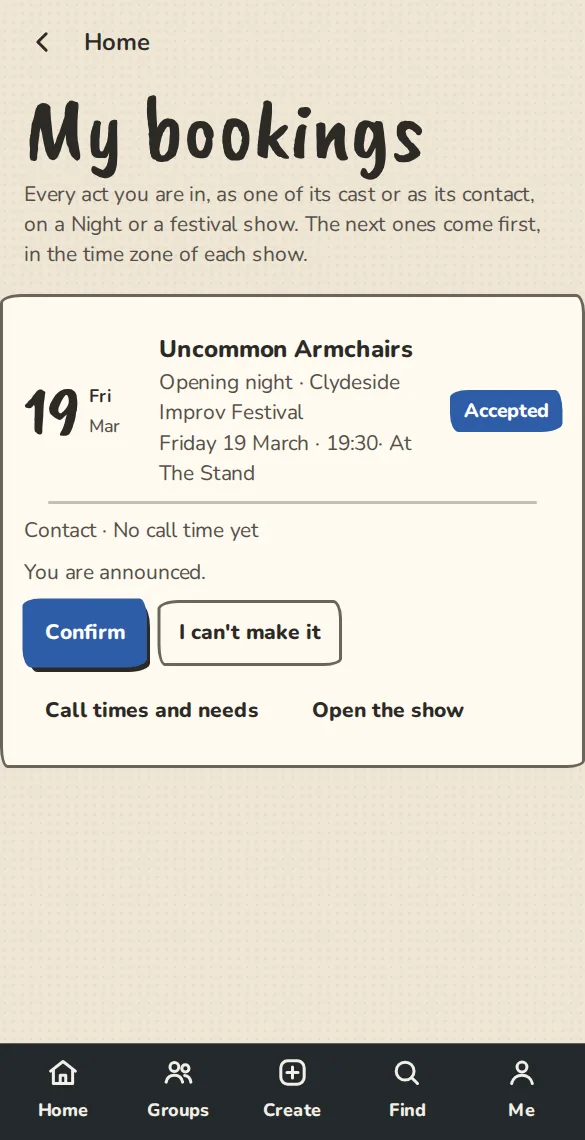
The My bookings page on a phone: the acts you are in, with when and where. - 2
Each booking says when and where (in the time zone of the show, with the stage for a festival), your call time when the organiser has set one, and where it stands: Invited, Accepted, Confirmed, Reserve or Withdrawn.
- 3
It says Not announced yet: please keep it quiet until the organiser announces the lineup, then You are announced.
- 4
If an organiser agreed a fee with you, you see Fee agreed, Paid or Received and a link to your fee page.
Confirm or say you cannot come
- 1
Once an act is accepted, tap Confirm when you are sure of the date. It is the same as the Confirm link in the email.
- 2
If plans change, tap I can't make it. The act comes off the lineup, the organisers are told, and the slot can go to a reserve act.
- 3
Both buttons stop once the show has started. A cast member can answer for the act as well as its contact.
Booked twice
- 1
If two of your bookings overlap, each says You're also booked at the other group then.
- 2
At a festival it also warns when two shows at different places are closer than the festival's travel buffer (30 minutes unless the festival changed it).
- 3
Only you see this, and the organisers of the team whose act it is, for their own players. A show or festival organiser never sees your other bookings.
Good to know
What it doesn't do yet
Try it in a sandbox
Make a private copy with made-up people and follow these steps without changing anything real.
Still stuck?
Write to us from the contact page. Say which page you were on and what you tapped.