Every city has a page of everything on for the next 4 weeks (shows, jams, drop-ins, workshops and classes, from groups on ImprovTeam and from theatres and schools listed by hand), with the teams, venues, coaches and festivals of its scene underneath. You do not need an account to read it.
Following a group or a listed theatre puts its public events on your Home page and in your calendar feed. You do not join anything.
Find your city
- 1
Open What's on from Find and book: in the side bar on a computer, the Find tab on a phone, or the Directories menu when you are not signed in. If we know your city, its page opens straight away. See every country and city
- 2
The list runs day by day. Each row shows the start time, the venue, the kind of event and how many spots are left, or Full · waitlist. A row from a listed theatre or school says where it came from (From example.org).
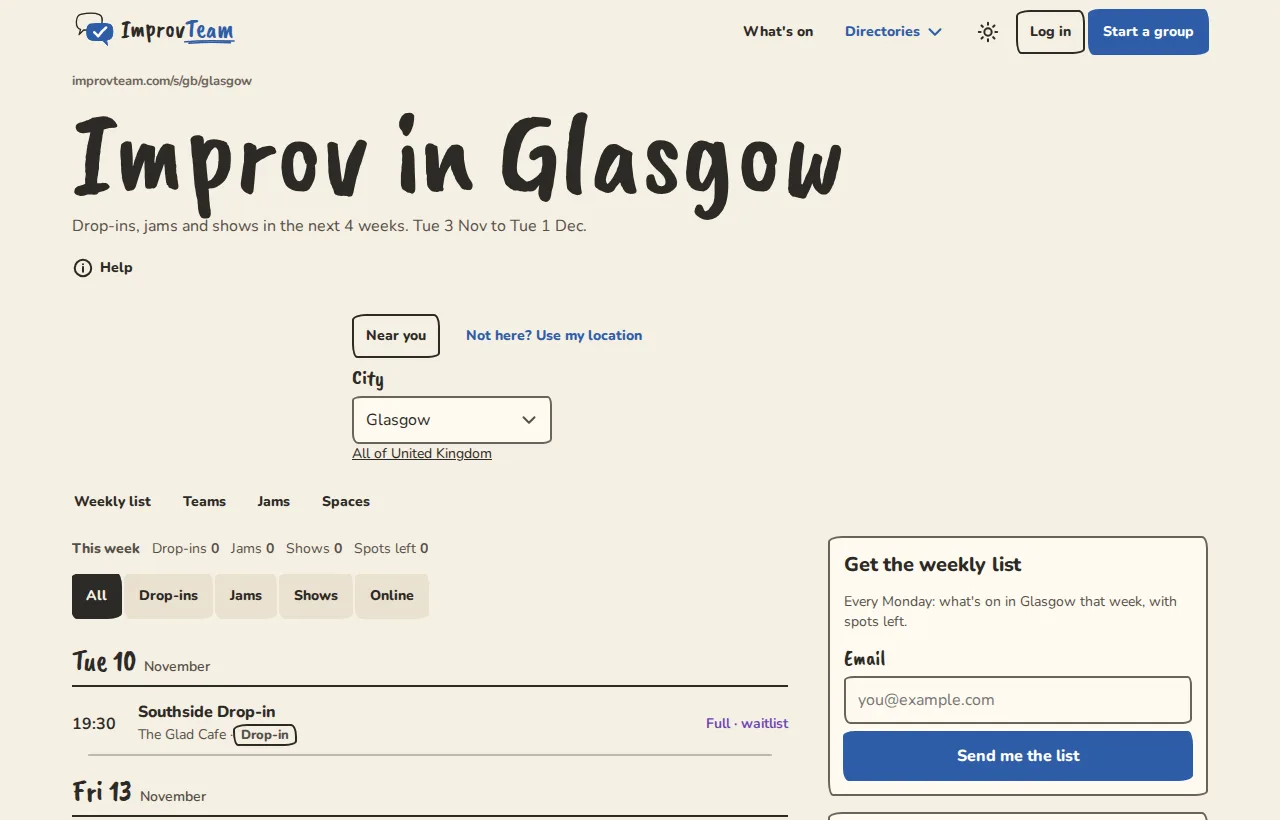
Glasgow's city page on a computer: what's on this week and the scene's teams, venues and jams. - 3
Tap Drop-ins, Jams, Shows, Workshops, Classes or Online above the list to see one kind. The This week line counts the drop-ins, jams, shows, workshops and classes, and the spots left, this week.
- 4
Tap a row to open its page. That is where you sign up to a drop-in or jam, or see how to get in to a show.
- 5
To look at another city, pick it under City and tap Go. Near you takes you back to your own, and All of United Kingdom (or your country) lists every city in it.
- 6
Further down, On the scene in your city lists who is there: the teams and open groups, show venues, coaches, classes and courses, festivals and rehearsal spaces. The dates are all in the list above. Also on the scene are places listed by hand that are not on ImprovTeam yet.
Find something for beginners, or step-free
- 1
Under the Drop-ins, Jams and Shows buttons, tap Beginners welcome. The list, the workshops and the courses keep only what the organiser marked for people new to improv.
- 2
Tap Step-free for events at venues that say they have step-free access. An event page lists everything its venue says about access: step-free access, an accessible toilet, a hearing loop, seating, relaxed performances, and a short note.
- 3
Tap a pressed button again to turn it off. Both can be on at once, and they work with I'm visiting too.
See what is on while you visit
- 1
On the city page, find I'm visiting (to the right of the list on a computer, or tap I'm visiting at the top).
- 2
Pick the first and last day of your trip, up to 31 days, starting any time in the next six months, and tap Show those dates.
- 3
The page lists what is on during those days. The address in your browser now holds the dates, so you can send it to someone. Back to the next four weeks goes back.
- 4
A festival's page links to its city over the festival days: Visiting for the festival? See what else is on.
Put a city in your calendar
- 1
On the city page, find Subscribe in your calendar.
- 2
Tap the button for your calendar: your phone's calendar, Google Calendar or Outlook. The public drop-ins, jams and shows of the next 60 days appear there and keep up to date.
- 3
Turn on Beginners welcome or Step-free first and the calendar gets only those.
Get the weekly list by email
- 1
On the city page, find Get the weekly list. On a computer it sits to the right of the list; tap Weekly list at the top to jump there.
- 2
Type your email address and tap Send me the list.
- 3
Open the email we send and tap Yes, send me the list. Nothing comes until you do.
- 4
Every Monday you get that week's drop-ins, jams and shows in the city, with spots left. To stop, tap the unsubscribe link at the bottom of any of them, then Unsubscribe.
Follow a group or a listed theatre
Follow the places you want to keep an eye on: the theatre you go to, a team whose shows you like, the monthly jam. Nobody asks you to reply to anything.
- 1
Look for the Follow button next to a group or a listed theatre on the city page, in Teams and groups, or on a group's About tab.
- 2
Tap it. You log in first if you are not signed in. If a page opens asking, for example, Follow Southside Drop-in?, tap the button under it to confirm.
- 3
The place's public shows, classes and sessions now appear under From places you follow on your Home page, the next 8 of them, and in your calendar feed.
- 4
To stop, tap the button again, or open Settings, then Following, and tap Stop following. Open the places you follow
Good to know
What it doesn't do yet
Try it in a sandbox
Make a private copy with made-up people and follow these steps without changing anything real.
Still stuck?
Write to us from the contact page. Say which page you were on and what you tapped.