The city page already lists the public shows, jams and drop-ins of the week. These tools put that list where your community is: a Discord or Telegram channel every Monday, Instagram, Facebook, Reddit or WhatsApp.
They use only public events. A sandbox or a private event is never in them, and we never name a person. Show and venue names appear as the groups typed them.
Copy this week's list
- 1
Open your city's page and find Copy this week's list. On a computer it sits to the right of the list.
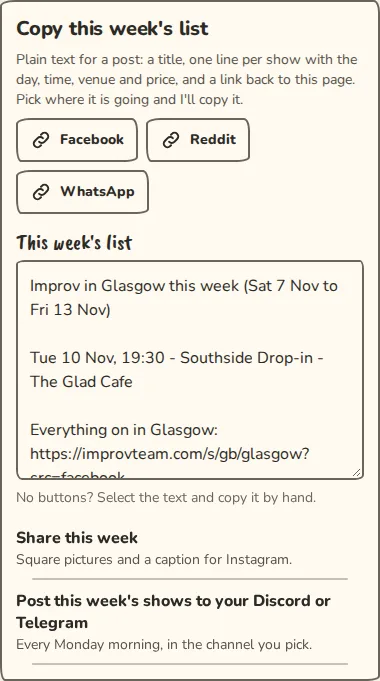
A city page on a computer: the "Copy this week's list" buttons for Facebook, Reddit and WhatsApp. - 2
Tap Facebook, Reddit or WhatsApp. We copy a title, one line per show with the day, time, venue and price, and a link back to the city page.
- 3
Paste it into your post. Without JavaScript the same text sits in the box below the buttons: select it and copy it by hand.
Post to a Discord channel every Monday
- 1
On the city page, tap Post this week's shows to your Discord or Telegram. You sign in first if you are not signed in.
- 2
In Discord, open Server settings, then Integrations, then Webhooks. Tap New Webhook, pick the channel and tap Copy Webhook URL. You need to be able to manage webhooks on that server.
- 3
Paste the address into Webhook URL and tap Connect Discord. We post one line to the channel to check it works.
- 4
Every Monday at 09:00 in the city's time, we post that week's shows there: at most 20, then and N more. A week with nothing on is skipped.
Post to a Telegram channel or group
- 1
Add the ImprovTeam bot to your channel or group as an administrator. Its name is on the connect page.
- 2
On the connect page, tap Get a code. The code works once, for 15 minutes.
- 3
Post the line it shows, for example /linkcity followed by the code, in your channel. We reply in the channel when it is linked.
- 4
Reload the connect page and the channel is listed. It posts every Monday like Discord does.
Make the Instagram pictures
- 1
On the city page, tap Share this week.
- 2
You get a cover, Improv in your city this week, and up to five pictures with two or three shows each, all square.
- 3
Tap Download all for a zip, or Download picture 1 and so on one by one.
- 4
Copy the caption under the pictures. It has a link back to the city page and a few hashtags to start from, such as #improv, #glasgowimprov and #comedy.
Good to know
What it doesn't do yet
Try it in a sandbox
Make a private copy with made-up people and follow these steps without changing anything real.
Still stuck?
Write to us from the contact page. Say which page you were on and what you tapped.