The door checks people in. A ticket is for one show. A pass has a ticket for every show it covers, so a pass can be scanned at any of them.
A show's door
- 1
On the programme, open Edit on a show and tap Door list.
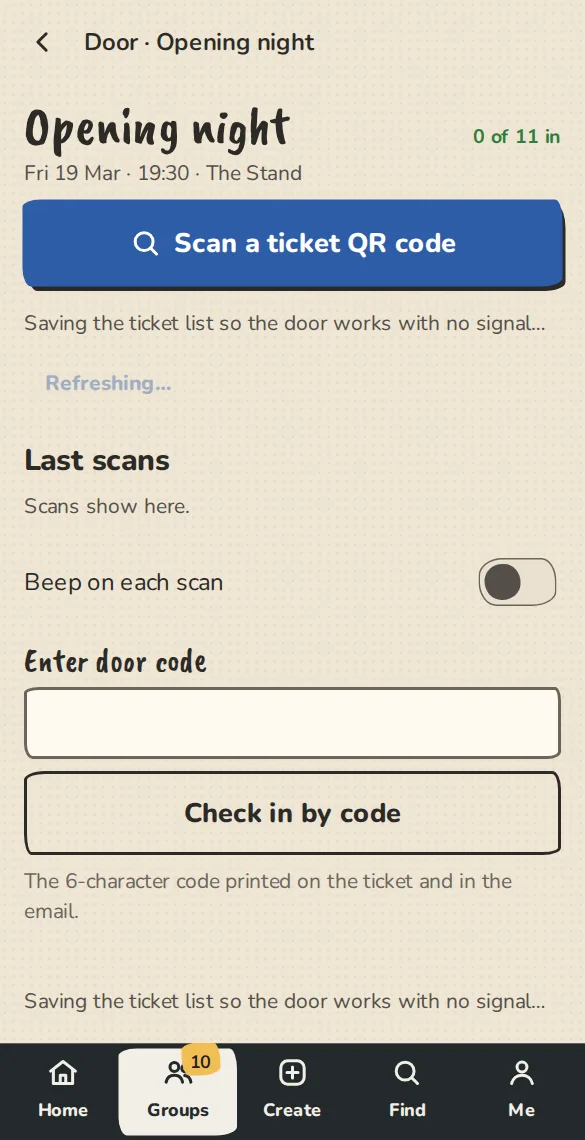
A festival show's door on a phone: scan a ticket, or type its door code. - 2
Scan a ticket's QR code or type its door code, or tick people in from the list. A QR code for another show says Wrong show and checks nobody in.
- 3
Door list (.csv) downloads the list as a spreadsheet, made in your browser.
A door for a stage or a venue
- 1
Open Run sheet, pick a day and a venue, then tap Door for this stage or Door for the whole venue.
- 2
The page checks tickets and passes in against the show that is on at that door. A ticket for another show says Wrong show and says which show it is for.
- 3
When nothing is on, the page lists the next show on each stage.
Good to know
What it doesn't do yet
Try it in a sandbox
Make a private copy with made-up people and follow these steps without changing anything real.
Still stuck?
Write to us from the contact page. Say which page you were on and what you tapped.