A festival team is a real team that you build for one edition of the festival, usually from the performers who applied. It has its own schedule, cast and messages, and it plays in the programme as one of your acts.
Organisers of the festival (its owner and admins) set it up. The organisers can open any festival team and step in without joining it.
Start a team
- 1
On the festival dashboard, tap Teams, then fill in Start a team: a Team name, an optional Director or coach (email) and how many players you want.
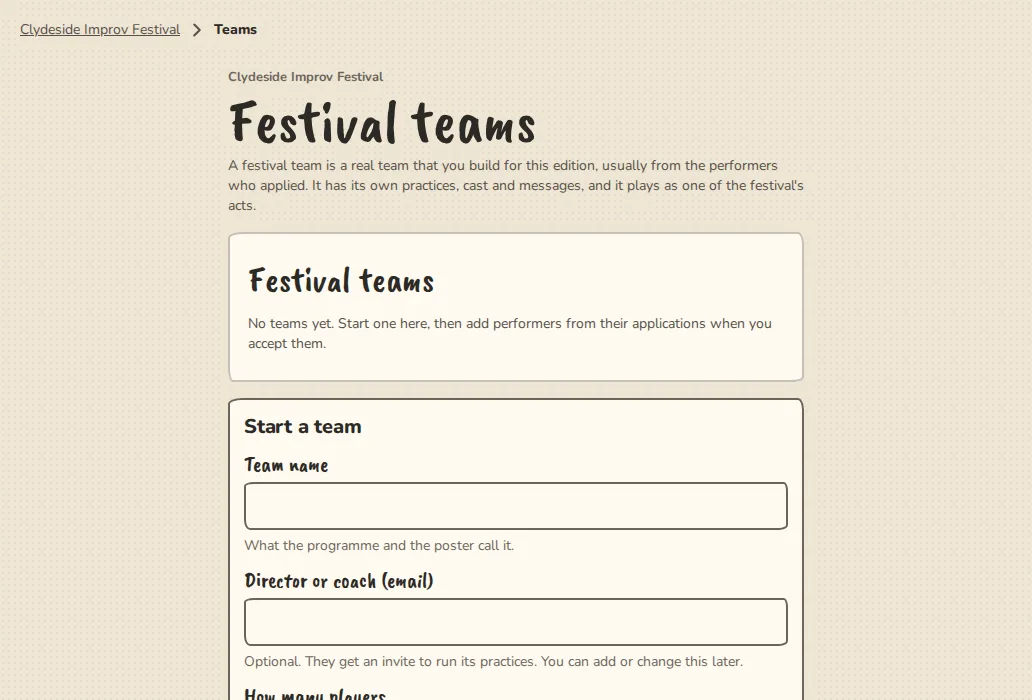
A festival's Teams page on a computer, with the form to start a team. - 2
A director or coach is invited to run the team's practices. You can add or change one later.
- 3
The Teams page shows each team with 3 of 8 in, who is invited and how many came from applications. Open the team goes to the team itself.
Put people in it
- 1
In the decision flow, open the preview of one performer's application. Choose Add to a festival team and pick the team. They get an invite to join it, and no separate act is made for them.
- 2
Or, on the Teams page, type email addresses under Invite players by email and tap Send invites. The invites go out over the next few minutes. The team's own People tab also has an invite link.
- 3
If you decline or waitlist someone later, their place is taken away and an invite they have not answered is withdrawn. Someone who already joined stays.
When the festival ends
- 1
The team is archived: read only, with its history kept.
- 2
To keep it going, tick Carries on after the festival on the Teams page. It becomes an ordinary team that you hand over.
Good to know
Try it in a sandbox
Make a private copy with made-up people and follow these steps without changing anything real.
Still stuck?
Write to us from the contact page. Say which page you were on and what you tapped.