Teams, teachers and mixer players apply through one form on your festival site. Reviewers score the applications (see "Reviewing applications"), and you send the decisions from the inbox.
Want to try this first? A sandbox has made-up people and nothing is sent or charged. How a sandbox works
The submission form
- 1
Applicants open yourfestival.improvteam.com/submit and choose Perform with your team, Teach a workshop or Join a mixer ensemble.
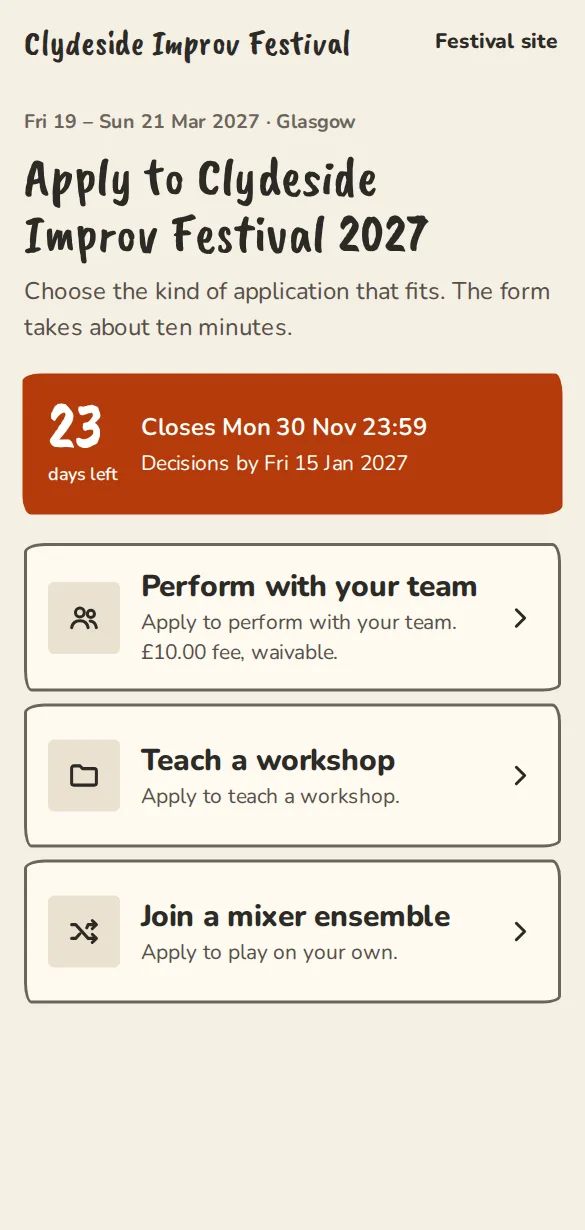
A festival's submission form on a phone: the choice of how to apply. - 2
Teams go through 4 steps: Your team, Your set, Availability and travel and Fee and send. Teachers and mixer players have 3 steps and never pay a fee.
- 3
A team already on ImprovTeam can type its page address and tap Prefill to skip most of the first step.
- 4
With a fee and Stripe connected, the last button reads like Pay £20 by card. Without cards it says Send application, and you email them how to pay.
- 5
If you let teams waive the fee, they see "Tick this if you can't afford it, and the fee is waived without any questions." It is never part of how you choose.
- 6
Applicants get an email copy with a reference like CLY-0412 and a link to edit their application until submissions close.
- 7
Before your window opens, the submit page and your festival site offer Email me when submissions open. When you tap Open submissions, or the opening time passes, each address gets one email over the next few minutes and is deleted. The dashboard shows how many are waiting, never who. If the window closes or the festival ends first, the addresses are deleted unsent.
Sending decisions
- 1
On a submission, tap Shortlist to mark it for later.
- 2
Under Decision, pick Accept, Waitlist or Decline. Nothing is sent until you confirm.
- 3
The Preview the email sheet shows the subject and message. Edit them if you want. For an acceptance, Include act pack link adds a button to the act pack.
- 4
Tap Send acceptance, or the waitlist or decline button. To change the status without a message, choose Change the status without emailing.
- 5
For several at once, tick rows in the inbox, then pick the decision in the bar at the bottom. Up to 20 submissions at a time.
- 6
Accepting puts the act on the programme, ready to place. A teacher's workshop is added too, waiting for a time and a room.
- 7
To build a team out of performers instead of giving each an act, see Festival teams.
Good to know
What it doesn't do yet
Try it in a sandbox
Make a private copy with made-up people and follow these steps without changing anything real.
Still stuck?
Write to us from the contact page. Say which page you were on and what you tapped.