A freelancer is someone a group books for a practice, a class or a show: a musical director, photographer, videographer, lighting, sound, technician or designer. Coaches have their own guide. One profile can offer several roles, each switched on or off.
Requests, answers and the fee are in the app. The group pays the freelancer directly; ImprovTeam takes no payment and never holds money.
For freelancers: offer a role
- 1
Make a profile first (Settings, then Profile): a city, and Who can see it set to Anyone, so you are listed. Without those you are not in the directory. Open Your profile
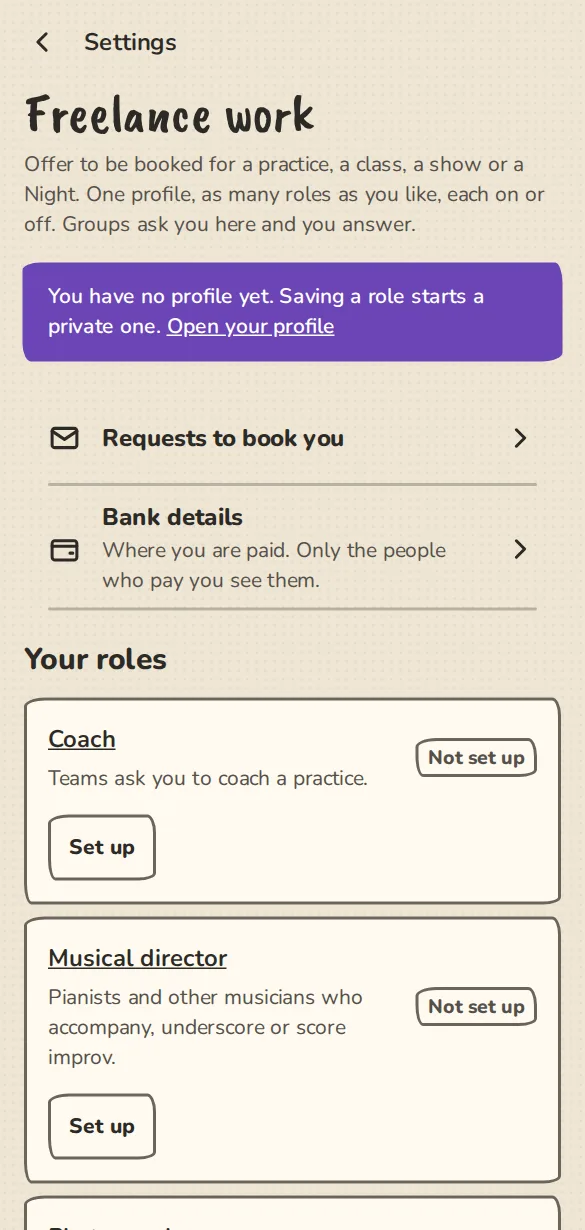
The "Freelance work" settings on a phone: the roles you can offer, each with a Set up button. - 2
Open Settings, then Freelance work. Tap Set up on a role. Open Freelance work
- 3
Pick what you do, what you play or bring, and what you need at the venue. Add styles, languages, how far you travel, a rate with what it is for (an hour, a session, a show, a day or a project) and a short bio.
- 4
Add up to four portfolio links (YouTube, Vimeo, Instagram, Flickr, Behance, SoundCloud or Bandcamp, and one website of your own) and up to six portfolio images.
- 5
Open Your questions for groups. The first is filled in for you; you can change it, remove it or add up to two more. Groups answer them when they ask.
- 6
Use Bank details under Freelance work to store where you are paid. Only the people who pay you see them.
Musical directors
- 1
Pick what you do: accompanying improvised musicals, song games and short form, underscoring long-form and scenes, scoring a whole show, playing for classes and rehearsals, teaching musical improv, live sound effects, or music for festivals.
- 2
Pick your instruments (piano or keys, guitar, bass, drums, ukulele, accordion, voice, electronics, other) and say whether you bring your own instrument and amp.
- 3
What you need at the venue (a weighted keyboard, a monitor) goes on the run sheet of a show you are booked for.
Photographers
- 1
Pick what you cover (shows, headshots, promo, festivals), your kit and how many days you take to deliver. When a group books you, its confirmation reminds the organiser to tell the performers and the audience that the show is being photographed.
Videographers
- 1
Pick what you do (filming shows, livestreaming, editing, promo videos) and your kit. The confirmation carries the same reminder to tell performers and audience about filming.
Lighting
- 1
Say whether you design, operate or program a desk, what you bring, and what you need at the venue.
Sound
- 1
Say whether you run the desk, design sound, mix live music, run playback or record, what you bring, and what you need at the venue.
Technicians
- 1
Say whether you stage-manage, run the desk, do the get-in and get-out or the whole show tech, and list the venues you know.
Designers
- 1
Say what you make (posters, branding, programmes, social media graphics) and how long you take.
For groups: find and ask
- 1
Open Find and book, then Book a freelancer, or go to a role's own list such as Musical directors. Filter by role, what they do and what they play, and tick Also people who travel here. Find a freelancer
- 2
Open a card and tap Request. Pick the group you run, what it is for (a practice, a class, a show or a festival show), and for a show or festival show choose it from your own upcoming ones: the date and length come from it.
- 3
Add a place and a message, answer the freelancer's questions and send the request. They get a notice with Accept and Decline.
- 4
Your group's Freelancers page, under Tools (a festival has a button on its dashboard), lists every request and answer, lets you cancel an open one and set a call time for a booked one.
Answering and being paid
- 1
Answer from the notice, or from Freelance work, then Requests to book you. A booking is in My bookings with its call time.
- 2
A booked freelancer shows on the show's or festival show's run sheet as their role, with a call time and what they need at the venue. They are never listed as an act.
- 3
A musical director is named on the public show page only once the host is announced. Photographers, sound, lighting, technicians and designers are never named there.
- 4
When the rate is in your group's currency, accepting makes a fixed fee from it on the fee page; change it there, add expenses and mark it paid. The freelancer taps Received.
Due dates, "What I'm owed" and invoices
- 1
On a fee, an organiser can set a due date (without one it is 14 days after the booking or show). The organisers are reminded on that day and a week later, and the fee shows as Overdue to both sides.
- 2
The person paid sees every fee across every group in What I'm owed, each in its own currency, with a filter by status and a CSV. Send a reminder on a fee tells the organisers (they never see an email address), once every 7 days. Open What I'm owed
- 3
The person paid can make a printable invoice from their fee page: their own running number, their name and address, VAT added when they set a rate, and the payment reference. Their invoice details are set once. Invoice details
- 4
Saved bank details can be shown to some groups and kept back from others, per group.
Good to know
What it doesn't do yet
Try it in a sandbox
Make a private copy with made-up people and follow these steps without changing anything real.
Still stuck?
Write to us from the contact page. Say which page you were on and what you tapped.