ImprovTeam never holds your money. When someone pays for a ticket, a course or their share of the room, the money goes to the group, never through us.
The ways a group gets paid
- 1
Payment links. A group adds its own links (Monzo.me, PayPal.me, Revolut, Wise and others) and they show on the Money tab and in you owe emails.
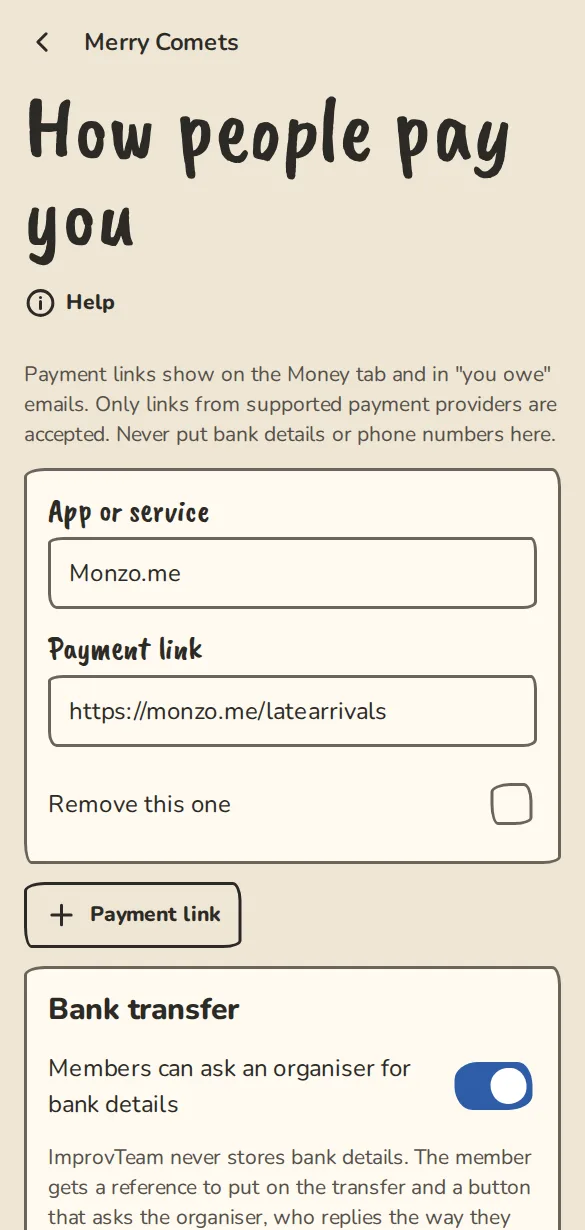
The "How people pay you" settings on a phone: payment links and bank transfer by reference. - 2
Bank transfer by reference. The payer sees the exact amount and a reference like IT-P6EC6, and taps a button to ask an organiser for bank details. The organiser replies the way they normally do.
- 3
Cash on the door. A group switches it on under Cash on the door in How people pay you, and it counts for anything at an in-person event: tickets, passes, workshops, drop-ins and courses. People reserve and pay in cash when they arrive, and the door marks them paid. For a cost share, the mail says to pay in cash at the next session. It does not count for an online event, which needs another way.
- 4
Cards, if the group connects its own Stripe account. Every card payment is made on that account and Stripe pays the group out. We never see the money.
Setting it up for your group
- 1
Open the group's Settings, then How people pay you.
- 2
Under App or service and Payment link, add each link. Only links from known payment providers are accepted.
- 3
To offer bank transfer, tick Members can ask an organiser for bank details and choose Who answers the requests. Tap Save changes.
- 4
For tickets, passes and workshops without cards, open Pay directly in Settings and set how many hours a reservation is held. Unpaid reservations are released after that.
- 5
To take cards, open Take card payments (optional) on the same How people pay you page and tap Connect Stripe. You sign up with Stripe yourself, and the account is yours.
- 6
Until a group has a way to be paid, we will not let it split a cost, remind people what they owe, open a paid course, or put paid tickets, passes or workshop places on sale. Each of those screens shows Set up how I get paid, which brings you back to where you were. Only an owner can set it up. Free things are never held back.
Fees
- 1
Stripe charges its usual fee on card payments. It is taken from the group's own Stripe account, not from the person paying.
- 2
Nobody pays extra to pay by card: the price shown is the price charged. Where you set a card price, we show about what Stripe will take (for a UK card, roughly 1.5% plus 20p) and about what you will receive. It is an estimate from Stripe's list prices, not a quote; your own Stripe account has the real figure. You can price it in if you like.
- 3
Payment links, bank transfer and cash go straight to the group. The bank or app may have its own charges.
Seeing what came in
- 1
Open the Money tab, then Income by source. Organisers see tickets, passes, workshops, courses, merch, tips, room hire, hire fees from house-team shows and door cash, by month and by season, with refunds taken off. Each currency is shown on its own.
- 2
Pick the dates and, if you like, one source. Transactions (CSV) is one row per order for your accountant, with order references instead of names. Tick Include buyers' names only if you need them. Summary (CSV) is one row per month and source.
- 3
This is a record of what the app knows. It cannot see your bank account, and Stripe's fee is not taken off, so card income is what buyers paid. Older orders that carried a separate card fee leave that fee out.
Showing each act its share
- 1
After a show, open its wrap-up and tap Act statements. Each act on the lineup gets its equal share of the acts pool. Print one sheet per act or download the CSV.
- 2
You hand each act its share yourselves. Tap Mark as settled on an act to note that you did, with an optional short note. Nobody is told and no money moves. Please do not put bank or card details in the note.
- 3
Tap Share with the acts and each act's contact, or the admin of the team you invited, can read their own statement from their act page. They never see another act's figures.
Good to know
What it doesn't do yet
Try it in a sandbox
Make a private copy with made-up people and follow these steps without changing anything real.
Still stuck?
Write to us from the contact page. Say which page you were on and what you tapped.