Refunds are made by the group that was paid, never by ImprovTeam. We hold no money, so there is nothing for us to send back.
How you refund depends on how someone paid: by card through the group's Stripe account, or directly to the group.
Refund a ticket
A ticket is refunded from its show's Orders page. The group's Money tab takes you there.
- 1
Open the group, then the Money tab and its Shows side. Tap Orders and refunds on the show. You can also open the show from the side bar and tap its Orders tab, or, on the show's full door list, tap Refund beside a paid ticket.
- 2
Find the buyer: search by name or email. Their order lists each ticket.
- 3
Tap the buyer's name to open the order, then Refund…. One sheet shows everything: tick the tickets to refund (one ticket from an order of three is fine), write a reason the buyer will see, read which tickets stop working, and tap the red button with the amount on it.
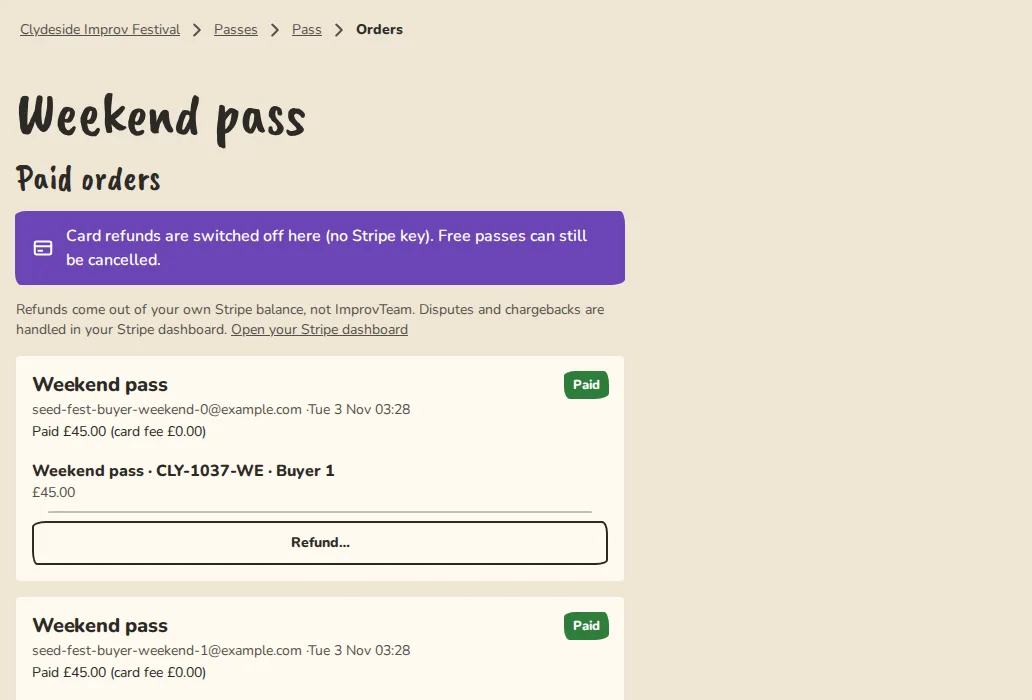
A festival pass's orders on a computer, each with a Refund button. - 4
The money goes back from your group's own Stripe balance, the buyer is emailed and the refunded tickets stop working at the door. A ticket paid by link, bank transfer or cash is cancelled, not refunded: see A direct payment.
A card payment
For show tickets, festival passes and workshops, tips and merch, and members' shares and subs paid by card.
- 1
Open the order. For a show ticket, see Refund a ticket above. For a share or a sub, open the Money tab, then Subs and cost card payments.
- 2
Find the payment and tap Refund….
- 3
Tick what to refund. You can refund one ticket from an order of three. A refund returns what the buyer paid. On an older order that carried a separate card fee, that fee goes back in proportion.
- 4
Write a reason (the buyer sees it) and tap the button with the amount, like Refund £45.00.
- 5
The money goes back from the group's own Stripe balance and the buyer is emailed. Refunded tickets and passes stop working at the door.
A direct payment
- 1
For someone who paid you by link, bank transfer or cash, find their order and tap Cancel, then Cancel and void.
- 2
Their tickets or passes stop working and they are told that any refund is between them and you.
- 3
Hand the money back the way it came: a bank transfer, a payment link or cash.
A ticket given back
On a show you can let ticket holders give a ticket back: open the show form, then "Tickets", and tick "Let ticket holders give tickets back". It is off until you do. Holders can also offer a ticket to a named person, who accepts it by email and then gets their own QR code; that is on unless you switch it off, and the same section sets how many hours before the start both stop.
- 1
When someone gives a ticket back, their QR code stops working and the seat is free again. If the show was sold out, the next person on the waitlist is offered it.
- 2
Open the show's Orders and refunds. The Given back list shows who, what they paid and how, and whether the seat was taken again.
- 3
You decide about the money, one tap each. For a card payment tap Refund (from your own Stripe account, optionally with a note they see). For a direct payment tap Settled by hand once you have sorted it out yourselves. Or tap No refund.
- 4
Nothing is refunded unless you tap it. ImprovTeam never refunds for you, and holders cannot set or record a price when they pass a ticket on.
Someone paid twice
- 1
ImprovTeam spots a card payment that cannot be used: the order was already paid (for example you marked it paid while the person was on Stripe's page), was cancelled or refunded, or the payment took a show, workshop or pass over its limit. The order shows a red Paid twice, Paid after it was released or Paid, but over the limit banner, and the Money tab says how many are waiting.
- 2
Tap Refund on the banner. The extra payment goes back from your own Stripe account, the first payment and its tickets stay as they are, and the person is emailed with your group's name and the amount. A second tap does nothing.
- 3
Tap Keep it if you want to sort it out yourself, for example if it was a gift. Nothing is refunded and the banner goes away.
- 4
Nothing is ever refunded on its own: it is your decision. If it was paid by link, transfer or cash, give that money back yourself. Two orders for the same show are two separate orders: refund or cancel the one they did not mean to make.
Good to know
What it doesn't do yet
Try it in a sandbox
Make a private copy with made-up people and follow these steps without changing anything real.
Still stuck?
Write to us from the contact page. Say which page you were on and what you tapped.