Choose how dates, times and money look for you, which time zone your home feed uses, and whether the app is paper or chalkboard.
These choices follow you to every device you sign in on, apart from the theme and texture, which stay with the device.
Region, time zone and clock
- 1
Open Settings, then Theme, language and region. On a phone it is under Me, then Language and region. Open Language and region
- 2
Region format decides the order of day and month, the first day of the week and how money is written. Automatic follows your browser, and the hint under it says which format that is.
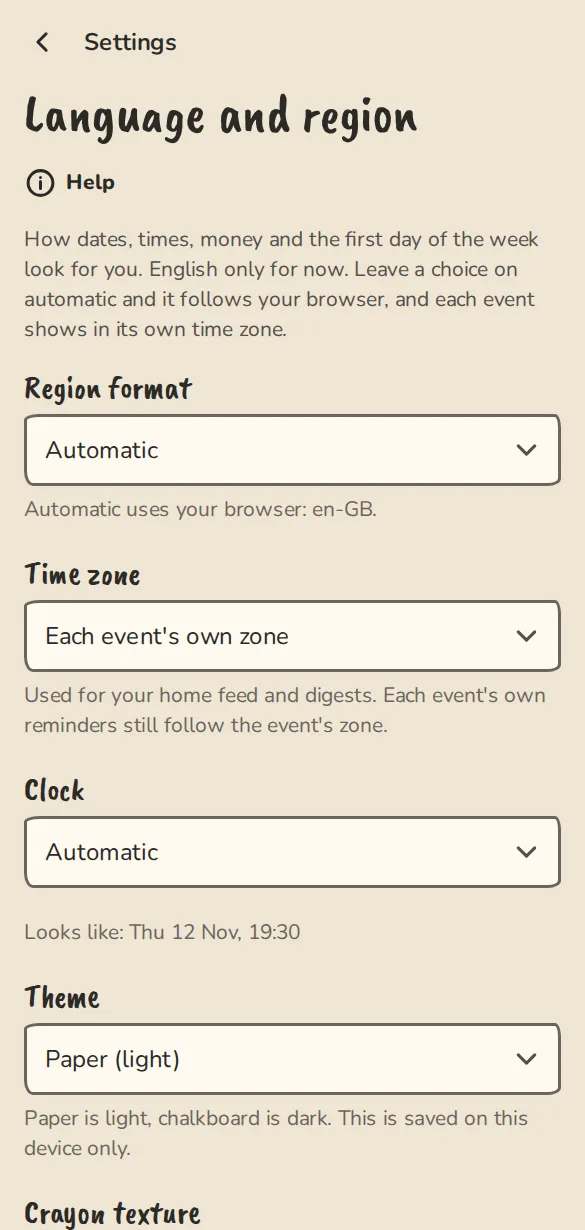
The "Theme, language and region" settings on a phone: language, time zone and 12 or 24-hour clock. - 3
Time zone is the zone for your home feed and digests. Leave it on Each event's own zone and every event shows in the zone it happens in.
- 4
Clock is 24-hour (19:30) or 12-hour (7:30 pm). The Looks like line under it shows a sample date with your choices.
- 5
Tap Save at the bottom of the page. It saves every choice on the page at once.
Theme and texture
These two sit on the same page, above "Save". They are kept on this device only, so your phone and your laptop can differ.
- 1
Theme is Match this device, Paper (light) or Chalkboard (dark).
- 2
Crayon texture is the rough crayon edges and paper grain. Flat is cleaner and easier on an older phone or its battery.
- 3
Set them on each device you use. A new device starts on Match this device.
Good to know
What it doesn't do yet
Try it in a sandbox
Make a private copy with made-up people and follow these steps without changing anything real.
Still stuck?
Write to us from the contact page. Say which page you were on and what you tapped.