A code of conduct says how your group looks after people. Publish yours and a "Code of conduct" badge shows on your public page, your join page and your sign-up and ticket pages. It is a badge, not a gate: nobody is stopped from joining or buying. For owners and admins.
You can also take private reports. They go only to the people you name, and nobody else can read them: not your other admins, and not ImprovTeam.
Write and publish your code
- 1
Open the group, then Settings, then Code of conduct.
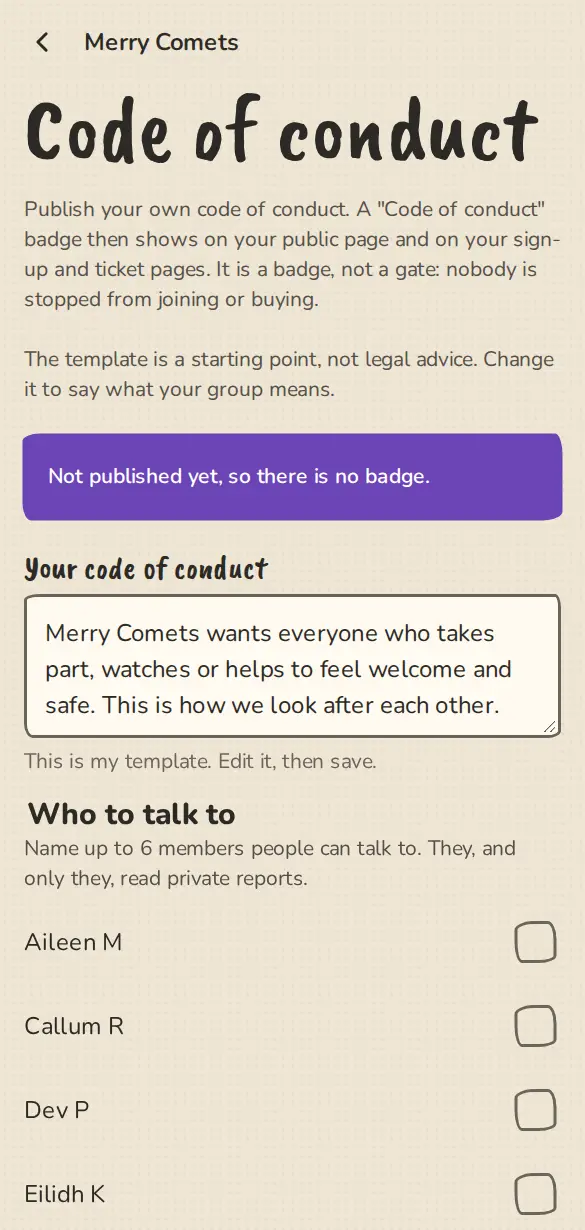
The code of conduct settings on a phone: the template, and who people can talk to. - 2
Start from our template and change it to say what your group means. It is a starting point, not legal advice.
- 3
Tap Save, then Publish. The badge and the public page appear. Take it back to a draft hides them again.
Name who to talk to
- 1
Under Who to talk to, tick up to six members. Their names show on the code page.
- 2
Switch on Take private reports. Reports stay off until a code is published and at least one person is named.
- 3
Only the people you tick can read reports. If you want to read them, tick yourself.
When someone sends a report
- 1
A person on your code page writes what happened. They can leave their name off. A signed-in person can tick Tell them it is me.
- 2
Each named contact gets a short notice that a report waits. It never has the text of the report.
- 3
Open Private reports from the code page or from Settings. Write a private note of what you did and tap Close this report. You can reopen it.
- 4
Closed reports are deleted after 12 months and open ones after 24. ImprovTeam does not investigate and does not read them.
Keep your listing current
- 1
Open Settings, then Listing check, and tap Yes, my listing is current. The date shows on your public page as Confirmed by the organiser on ....
- 2
We remind owners and admins of public drop-ins, theatres, venues and festivals every three months.
- 3
If a visitor taps This is out of date on your page, you get a notice and the count shows on the Listing check page. Confirming clears it.
Good to know
What it doesn't do yet
Try it in a sandbox
Make a private copy with made-up people and follow these steps without changing anything real.
Still stuck?
Write to us from the contact page. Say which page you were on and what you tapped.