A team always has an owner. Before you step back, make someone else the owner, or delete the team if it has run its course.
Make someone else the owner
- 1
Open the team, then the People tab, and tap the person.
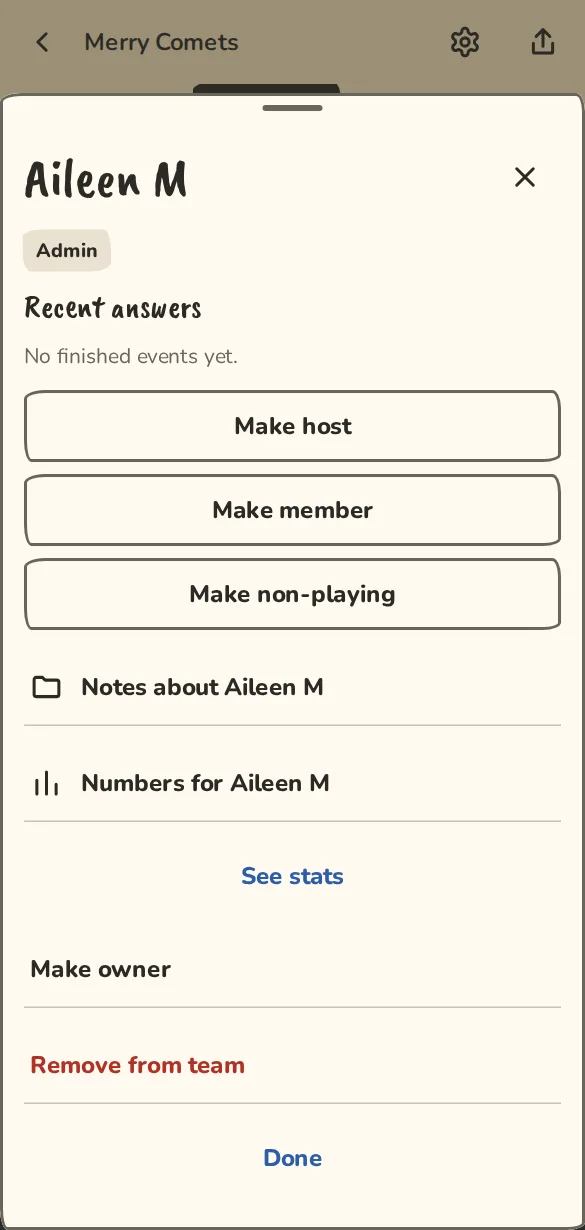
A team's People tab on a phone, with a member's sheet open: Make owner is near the bottom. - 2
Tap Make owner. The sheet says what happens to payments before you confirm.
- 3
Tap the button with their name. You become an admin, and they and the other members are told.
- 4
Card payments pause until the new owner chooses Keep this Stripe account or Connect my own, and payment links stay hidden from members until they tap These payment links are ours.
If the owner has gone quiet
- 1
If the owner has not signed in for 12 months, admins see The owner is away in Settings, with Ask to take over.
- 2
The owner gets a message with a one-tap Keep it and 30 days to answer.
- 3
If nobody objects, the admin who asked becomes the owner.
Delete the team
Only the owner can do this, and it can't be undone.
- 1
Open Settings, then Delete this group.
- 2
Tap the delete button, type the team's name to confirm and tap Delete group.
- 3
Every event, answer, cost and member record goes.
Leaving ImprovTeam while you own a team
- 1
Open your own settings, then Sign-in and account, and tap Delete my account…. Open Sign-in and account
- 2
For each team you own alone, pick the new owner. The longest-serving admin is chosen for you. With no admins, pick a member or delete the team.
- 3
Your choices happen straight away. The account itself is deleted after 7 days, unless you sign in before then.
Good to know
What it doesn't do yet
Try it in a sandbox
Make a private copy with made-up people and follow these steps without changing anything real.
Still stuck?
Write to us from the contact page. Say which page you were on and what you tapped.